Configure process definitions
Definitions is the root container for all the processes and elements in a BPMN model. They describe the non-visual components of a process. Unlike elements, which appear as shapes in a diagram, definitions represent underlying data or behavior that support the process — such as resources or messages.
Cardanit automatically detects and lists all the process definitions in the BPMN model.
You mange definitions in the Definitions tab of the Navigation panel.
To access the Definitions tab:
-
In the toolbar, click
to open the Navigation panel. -
Open the Definitions tab.
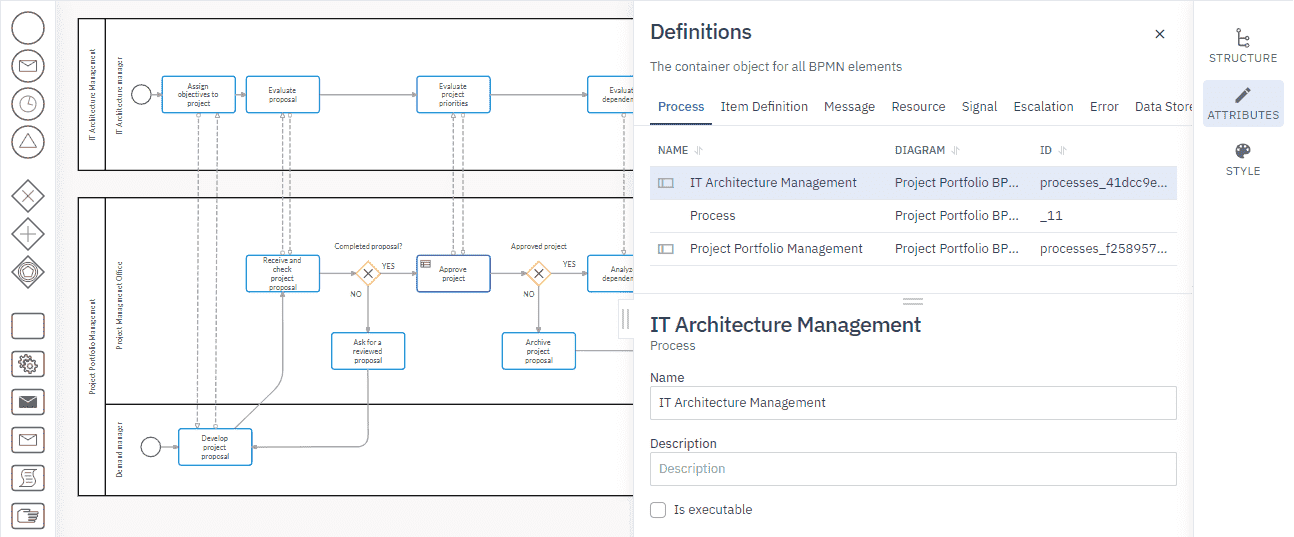
The definitions you can define for a process are:
| Definition | Description |
|---|---|
| Item definition | The types of data you can use in a BPMN model. |
| Message | The messages that are sent or received by a participant at the start, end, or during a process. |
| Resource | The resources that perform or are responsible for the activity. |
| Signal | Signals that are broadcast to everyone involved in the process. |
| Escalation | Escalations that a process might need to react to. |
| Error | The possible errors that can occur in the process. |
| Data Store | The data stores that are visualized by activities in the process. |
Add a definition
-
In the Definitions tab, click
next to the type of definition you want to add. A new definition is added with a default name. We recommend you give the new definition a meaningful name.
-
Select the new definition to edit its attributes.
Edit a definition
- Select the definition and edit the attributes as needed.
Remove a definition
- Click
next to the definition you want to remove.